Advertiser disclosure: This payment scam checker is free and independent. No company pays for it, and it doesn’t collect anything you enter. How we make money.
Short answer
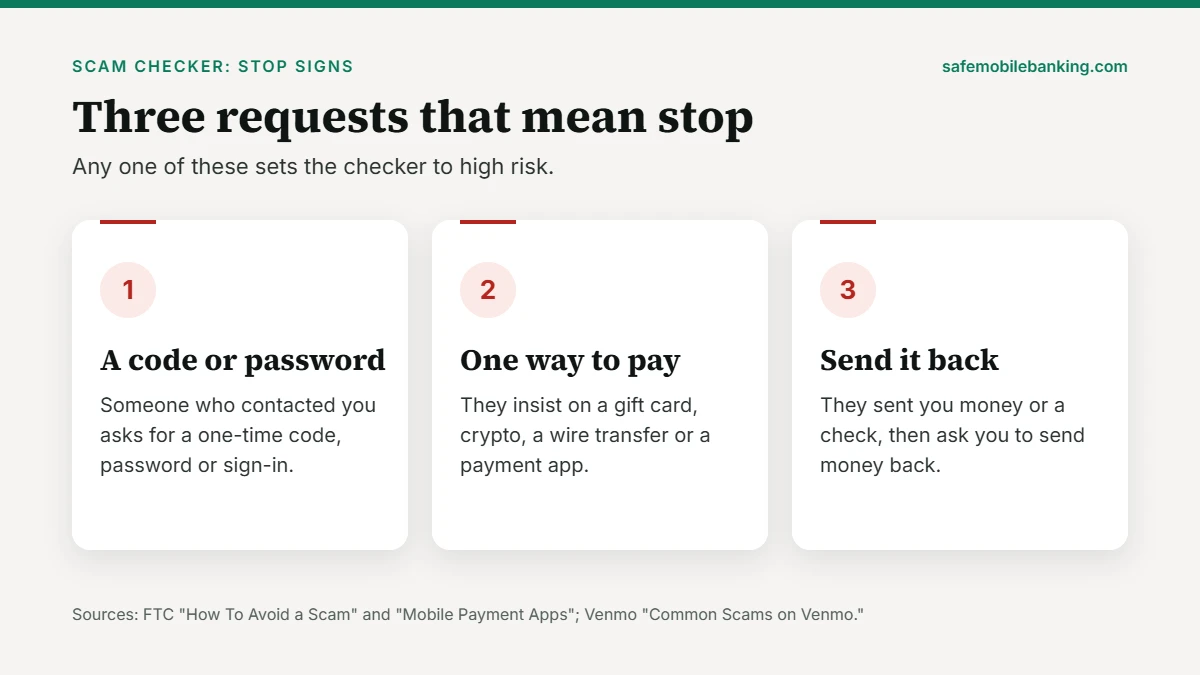
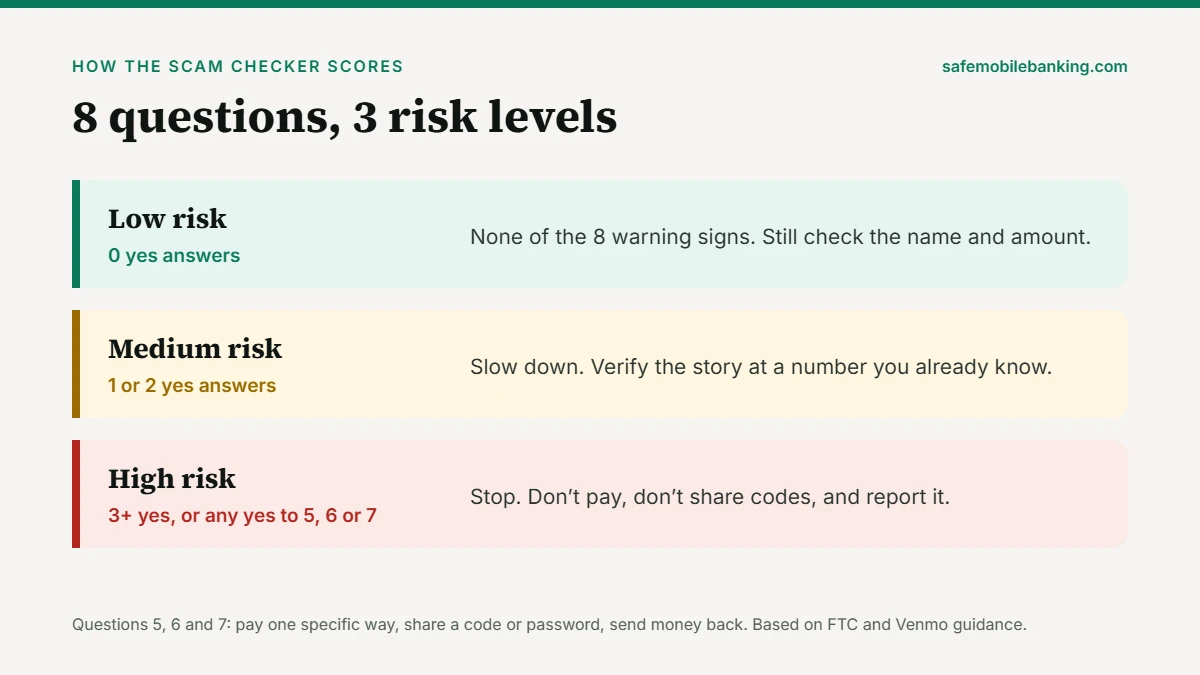
This scam checker asks 8 yes-or-no questions about a payment someone wants from you, then gives a risk level and the next steps. The questions come from the Federal Trade Commission’s four signs of a scam and payment-app warnings from the FTC, the Consumer Financial Protection Bureau and Venmo. One yes to a code request, a pay-by-gift-card demand or a send-it-back request marks the payment as high risk.
- Never share a one-time code or password with someone who contacted you.
- Never pay by gift card, crypto or wire because someone insists.
- Your answers stay in this tab. Nothing is saved or sent.
Start the 8-question check (Free. Takes about a minute. No sign-up.)
Last verified: November 18, 2026, against Federal Trade Commission consumer advice, Consumer Financial Protection Bureau payment-app tips and Venmo’s scam list.
How the payment scam checker works
Work through the three short steps about the message, call or request in front of you, then tap See my risk. A yes to question 5, 6 or 7 sets the result to high risk on its own, because the FTC and the payment apps tell you never to do those things. Three or more yeses also mean high risk. One or two mean slow down and verify.
Payment scam checker
8 questions. 3 short steps.
Think about the call, text, email or payment request in front of you.
- Step 1Who reached out
- Step 2What they want
- Step 3How the money moves
Private by design. Your answers stay in this browser tab. Nothing is saved or sent anywhere.
What are the 4 signs of a scam?
The Federal Trade Commission's guide on how to avoid a scam lists four signs. Questions 2 to 5 of the checker follow them in order:
- They pretend to be from an organization you know. The FTC says scammers use real names, like the Social Security Administration or the IRS, or a business such as a utility or tech company. Caller ID can be faked.
- They say there's a problem or a prize. You owe money, an account has a problem, a relative had an emergency, or you won something but must pay a fee.
- They pressure you to act immediately. The FTC notes they may tell you not to hang up so you can't check their story.
- They tell you to pay in a specific way. The FTC names cryptocurrency, wire transfer services, payment apps and gift cards.
Why do codes, checks and pay-first deals count most?
Three moves appear in the FTC's and the payment apps' own warnings. The FTC's mobile payment app advice says not to give your account credentials to anyone who contacts you. Venmo says its agents will never ask for the verification code sent to your phone. That's question 6.
The FTC also says never to deposit a check and send money back to someone. Venmo lists the "accidental" payment as a common scam: a stranger pays you, then asks you to return it as a new payment. That's question 7.
Question 8 comes from the Consumer Financial Protection Bureau's payment-app tips. It warns that a scammer may sell you concert or sports tickets and never deliver them, and that mobile payment services generally can't recall a payment once it's sent.
What should I do if the scam checker says high risk?
- Stop. Don't send money, gift card numbers, codes or passwords.
- Contact the company yourself. Use the number on your card, your statement or the official app, not a number from the message.
- If you already paid, call your bank, card issuer or payment app right away.
- Report it at ReportFraud.ftc.gov. Our guide on how to report a scam covers where else to report it.
The FTC's last tip is simple: before you do anything else, tell someone you trust what happened.
Which scam guides go with this checker?
Each guide below covers one app, marketplace or situation in detail:
- Venmo scams: 9 tricks to avoid
- Cash App scams: 8 tricks to avoid
- Facebook Marketplace scams
- PayPal scam emails
- What to do if your bank account is hacked
To check whether an app itself protects your money, see how we rate every app with the Safe Mobile Banking Score.
Run the check again (Answers clear when you tap Start over.)
Scam checker FAQ
Does this scam checker save my answers?
No. The scam checker runs entirely in your browser tab. Your answers aren't stored, sent to a server or shared with anyone, and they disappear when you tap Start over or close the page. There's no sign-up and no email required. Use it as many times as you like, for any message, call or payment request.
What makes the scam checker say high risk?
Any yes to question 5, 6 or 7 sets the result to high risk: being told to pay one specific way, being asked for a code or password, or being asked to send money back. Three or more yes answers of any kind also mean high risk. One or two mean slow down and verify the story another way.
Can a scam checker tell me for sure that something is a scam?
No. It checks for warning signs that the Federal Trade Commission and payment apps describe. A low result means none of those signs showed up, not that the payment is safe. Scammers change their stories, so verify anyone who asks for money by contacting them at a number or website you already know.
Is being asked to pay with a payment app a sign of a scam?
It can be. The FTC lists insisting on one payment method, including a payment app, gift card, wire transfer or cryptocurrency, as one of four signs of a scam. Paying a friend you know is different. The warning is about a stranger or a so-called company that will only accept that one method.
Where do I report a payment scam?
Start with your bank, card issuer or payment app, and ask them to stop or reverse the payment. Then report it to the Federal Trade Commission at ReportFraud.ftc.gov. Our guide on how to report a scam lists the other places to report, depending on how you paid and who the scammer pretended to be.
Sources
- FTC: How To Avoid a Scam
- FTC: Mobile Payment Apps: How To Avoid a Scam When You Use One
- CFPB: Helpful tips for using mobile payment services
- Venmo: Common Scams on Venmo
- FTC: ReportFraud.ftc.gov
This tool gives general information, not financial or legal advice. If you think you're being scammed, contact your bank or payment app directly.