Advertiser disclosure: This guide to Cash App scams is free and independent. Safe Mobile Banking may earn a commission from some companies we review, but Cash App and its parent, Block, Inc., don’t pay for this page. How we make money.
Short answer
Cash App scams usually ask you to do one of three things: send money first to get a bigger payout, give your sign-in code or PIN to fake support, or pay a stranger for something that never arrives. Avoid them by paying only people you know, getting help only inside the app, and never sending money to “claim” a payment. Cash App says payments between Cash App accounts are instant and usually can’t be canceled.
- Cash App says no legitimate business is “flipping cash”
- Cash App support never asks for your sign-in code or PIN
- A payment sent by “mistake” goes back with the Refund button, not a new payment
See the 4 rules that stop most Cash App scams (Free. Takes one minute.)
Last verified: November 17, 2026, against Cash App’s scam help pages, Federal Trade Commission consumer alerts and the Consumer Financial Protection Bureau’s January 2025 order against Block, Inc.
What are the most common Cash App scams?
Cash App’s own help center names the scams it sees most, and its trending-scams page opens with a holiday warning: “This holiday season, it is important to stay safe while sending and receiving funds.” The timing matters. People reported losing about $16 billion to fraud in 2025, the highest on record, according to the Federal Trade Commission.
| Scam | What they ask for | The tell |
|---|---|---|
| Fake Cash App support | Your sign-in code, PIN, a “test” payment or a remote-access app | Real support never asks for any of these |
| Phishing texts and emails | A click on a link to “verify” your account | The sender isn’t one of Cash App’s verified email domains |
| Cash flipping | A small payment they promise to “flip” into more | Cash App says no legitimate business flips cash |
| Fake giveaways and payment claims | A fee or payment to “claim” money | Cash App says it never requests funds from customers |
| The “accidental” payment | Send the money back | They ask for a new payment instead of a refund |
| Deposits for gifts, pets and rentals | Pay now, get the item later | No meeting, no proof, a price that’s too low |
| The “app glitch” | Download another version of Cash App from their site | A link to a Cash App download outside your app store |
| Survey and settlement scams | A purchase or fee to get a reward or file a claim | Real settlements send you to the administrator’s own site |
How do the 8 Cash App scams work?
1. Fake Cash App customer support
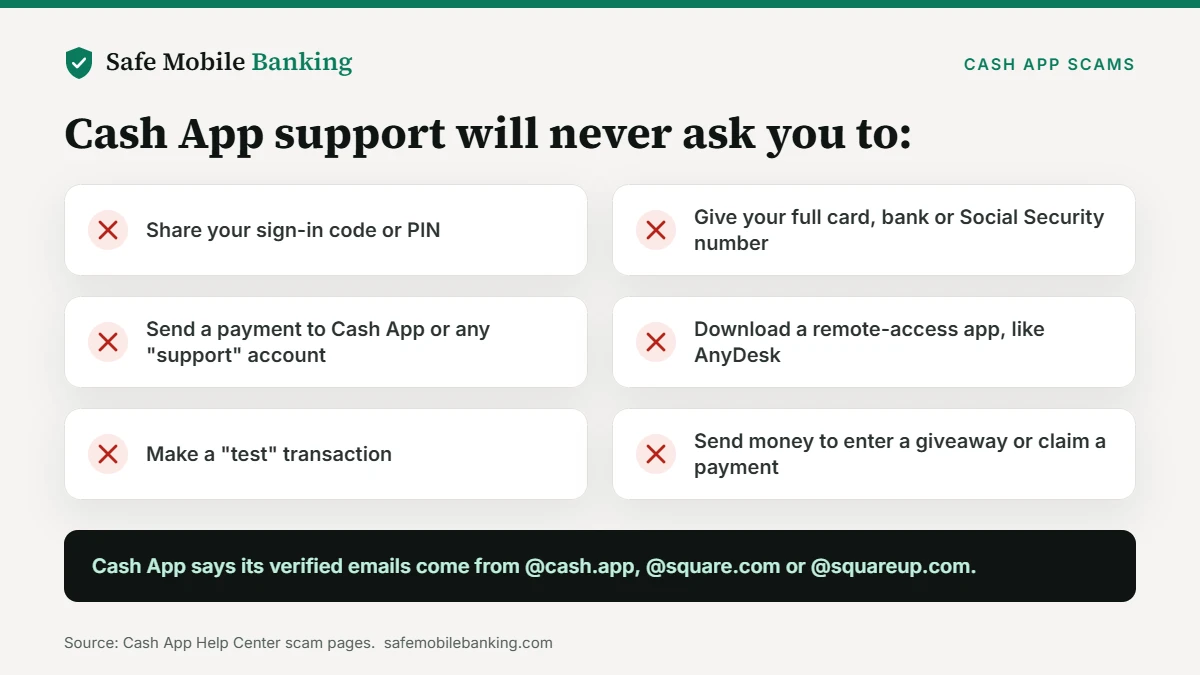
Scammers pose as Cash App support on the phone, by text and on social media. Cash App says impersonation on social media “is on the rise.” Its help center says support will never ask for your sign-in code, your full debit card number, your PIN, your bank account information or your Social Security number. Support also won’t ask you to send a payment to any account, download a remote-access app such as AnyDesk, or make a “test” transaction.
Get help only inside the app: tap the profile icon, then Support. Cash App also lists 1 (800) 969-1940 as a way to reach its support team. Hang up on anyone who calls you first and asks for codes.
2. Phishing texts and emails
Phishing messages push you to a fake site that looks like Cash App and collects your login or card details. Cash App says its verified emails always come from an @cash.app, @square.com or @squareup.com address. Report a suspicious text, email, call or social media message through the app or at cash.app/help.
3. Cash flipping
Someone on social media promises to “flip” your money: send a small amount now and get much more back. Sometimes they call the payment a “clearance fee” or “account verification.” Cash App’s answer is blunt: “There are no legitimate businesses that are ‘flipping cash.'” You send the money and never see it again.
4. Fake giveaways and “claim your payment” messages
Accounts using hashtags like #cashappgiveaway or #cashappfriday pose as official Cash App giveaways. Cash App says those hashtags aren’t part of its official partnerships. Its real sweepstakes run on its verified X (Twitter) account and pay from the verified Cash App account with a blue checkmark. A message that asks you to pay to “claim” a payment is always a scam. Cash App says it “will never request funds from a customer for any reason.”
5. The “accidental” payment
A stranger sends you money, then messages that it was a mistake and asks you to send it back. If you send a new payment, it comes from your own funds. Cash App says these scammers then dispute the original payment with their bank or card issuer, so they get paid twice.
Cash App’s fix: use the Refund option on the original payment, never a new payment. Decline requests from people you don’t know, and block the sender if it happens again.
6. Deposits for holiday gifts, pets and rentals
The seller asks for a deposit now and promises to deliver later. Cash App’s examples are puppy and kitten deposits and apartment deposits, often with fake photos and prices that are far too low. The same setup works for a sold-out holiday gift. Cash App says it “cannot guarantee a refund if you don’t receive what you pay for,” so pay only after you meet the seller and have the item. For marketplace sales, see our guide to Facebook Marketplace scams.
7. The “app glitch”
A scammer contacts you about a supposed glitch in Cash App and sends a link to download a different version. When you sign in on their site, they take your login and your money. Install or update Cash App only from your phone’s app store.
8. Survey and settlement scams
Fake Cash App surveys promise a reward but require you to buy products first. Cash App says it never requires a payment or your login to take a survey. Settlement scams copy real class action notices, then charge a fee to file your claim or threaten your benefits or paycheck. Cash App says genuine notices come from the settlement administrator and send you to a verified settlement website.
The 4 rules that stop most Cash App scams
- Pay only people you know, after you get what you paid for. Never send money for something promised later.
- Never share your sign-in code or PIN. Not with “support,” not with a buyer, not with a giveaway.
- Get help only inside the app. Profile icon, then Support. Ignore support offers that reach you first.
- Refund mistakes; never resend. Use Refund on the original payment, then block the sender.
Cash App also recommends turning on notifications and Security Lock, and checking the recipient’s profile before you pay.
Can you get your money back after a Cash App scam?
Often, no. Cash App says Cash App-to-Cash App payments “are instant and usually can’t be canceled.” Check the payment in your activity feed: if it shows a cancel option, use it right away. Cash Card purchases have a separate dispute process. The FTC puts it plainly: sending money through a payment app “is like sending cash,” and it’s very hard to get back.
Payments someone made without your permission are different. The FTC says to ask the app company and your bank to reverse any transactions you didn’t authorize.
On January 16, 2025, the CFPB ordered Block, Inc. to pay up to $120 million in redress to consumers and a $55 million penalty. The bureau found that Block failed to take timely and effective steps to prevent and address fraud on Cash App, closed reports of fraud without opening legally required investigations, and listed a Cash Card support number that led to a recorded message, not a person.
It also found that the lack of live phone agents resulted in “fake customer service lines through which consumers’ information would be stolen.”
The order requires Block to fully investigate unauthorized transactions and offer 24-hour, live-person customer service. Block agreed to the order without admitting or denying the findings. In a press release, Block said it “strongly disagree[d] with the CFPB’s mischaracterizations” and settled to put the matter behind it.
Block also says its payment warnings, which can pause a likely scam payment and show a warning, stopped more than $2 billion in probable scam payments from August 2020 through mid-2025. That figure is the company’s own.
What to do if you sent money to a Cash App scammer
- Report the payment in the app. Go to Activity, select the payment, tap Report an issue and follow the prompts.
- Report and block the account. Open the scammer’s profile, scroll to the bottom and tap Report or Block.
- Secure your account. If you shared your sign-in code or PIN, contact Cash App support in the app right away.
- Call your bank about unauthorized charges. If money left a linked card or bank account without your permission, ask the bank to reverse it.
- Report it to the FTC. File at ReportFraud.ftc.gov. Our guide on how to report a scam walks through each agency.
What do complaints filed with the federal consumer bureau show?
Consumers filed 16,161 complaints with the Consumer Financial Protection Bureau about Block, Inc., which runs Cash App and Afterpay, from November 1, 2025 to October 31, 2026. Of those, 5,710 (35.3%) were about fraud, scams or unauthorized transactions. Block reported closing 24 of the 16,161 (0.15%) with monetary relief. See how that compares with 25 other money-app companies in our Money App Complaint Report 2026.
Complaints are consumers’ claims as logged by the Consumer Financial Protection Bureau. The bureau doesn’t verify them, and a complaint isn’t proof of wrongdoing.
Is Cash App itself safe to use?
The scams above target Cash App users; they don’t make the app itself unsafe. Whether your money is protected depends on how you use the account. Our full Cash App safety review covers FDIC coverage, fees and regulators’ findings, and gives Cash App a Safe Mobile Banking Score of 7.5 out of 10. See how we rate every app.
Use Venmo too? The same pay-first and fake-support tricks show up in our guide to Venmo scams.
Read our full Cash App safety review (FDIC coverage, fees and its Safe Mobile Banking Score.)
Cash App scams FAQ
How do Cash App scams work?
Most Cash App scams get you to send money first or hand over account access. Scammers promise to flip your cash, ask you to pay to claim a prize, pose as support to get your sign-in code or PIN, or take a deposit for an item they never deliver. Because Cash App payments are instant and usually can’t be canceled, the money is hard to recover once it’s sent.
Will Cash App refund me if I get scammed?
Usually not for a payment you sent yourself. Cash App says payments between Cash App accounts are instant and usually can’t be canceled, and it can’t guarantee a refund if you don’t receive what you paid for. Report the payment in the app anyway. Transactions someone made without your permission are different: ask Cash App and your bank to reverse them.
How can I tell if a Cash App email or text is real?
Cash App says its verified emails come from @cash.app, @square.com or @squareup.com addresses. Treat any message that asks for your sign-in code, PIN, a payment or a remote-access app as a scam, whatever the sender looks like. Open Cash App yourself and check your account instead of tapping links in the message.
Is Cash App flipping real?
No. Cash App says there are no legitimate businesses that are flipping cash. Anyone who promises to turn a small payment into a bigger one, sometimes calling it a clearance fee or account verification, keeps the money and sends nothing back. If someone promises free money in return for a payment, Cash App says it’s a scam.
What should I do if a stranger sends me money by mistake?
Don’t send a new payment back. Cash App says scammers send money “by accident,” ask for it back, then dispute the original payment with their bank, so they get paid twice. Use the Refund option on the original payment instead, decline requests from people you don’t know, and block the sender if it happens again.
What is Cash App’s real customer service number?
Cash App lists 1 (800) 969-1940 for its support team, but says the best way to reach support is inside the app: tap the profile icon, then Support. Real support won’t ask for your sign-in code, PIN, full card number or Social Security number, and won’t ask you to send money or install a remote-access app.
Sources
- Cash App: Avoiding Common Scams with Cash App
- Cash App: Recognize Scams and Keep Your Money Safe
- Cash App: Protect Yourself from Trending Scams
- CFPB: CFPB Orders Operator of Cash App to Pay $175 Million and Fix Its Failures on Fraud (Jan. 16, 2025)
- CFPB: Block, Inc. enforcement action
- CFPB: Block, Inc. stipulation and consent (2025-CFPB-0001)
- Banking Dive: Block’s response to the CFPB and state regulators
- Block: Cash App’s payment warnings feature (June 26, 2025)
- FTC: Do you use payment apps like Venmo, Cash App or Zelle? Read this
- FTC: Making mobile payments? Protect yourself from scams
- FTC: People reported losing $3.5 billion to imposter scams in 2025
- CFPB Consumer Complaint Database
This guide is information, not financial or legal advice. Check Cash App’s current help pages before you act.