Advertiser disclosure: This guide to Apple Pay scams is free and independent. Safe Mobile Banking may earn a commission from some companies we review, but Apple Inc. doesn’t pay for this page. How we make money.
Short answer
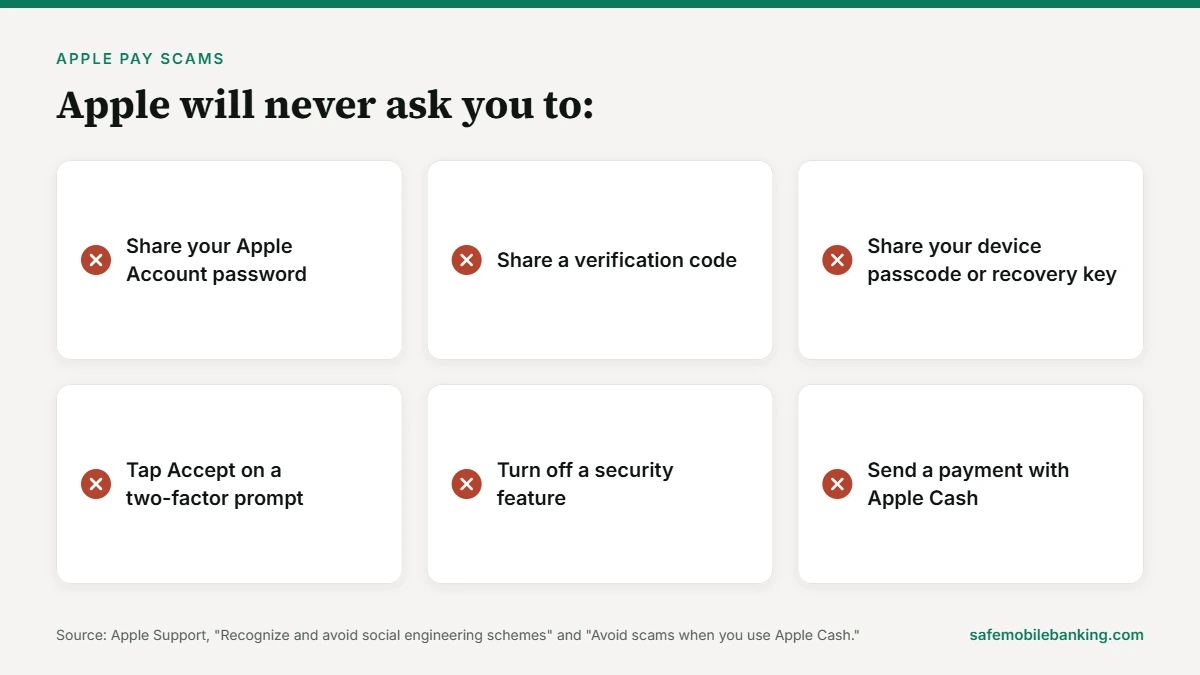
Apple Pay scams rarely break Apple Pay itself. They trick you into handing over a code, a password or an Apple Cash payment. Apple says it will never ask for your Apple Account password, verification codes or device passcode, and it won’t request payment through Apple Cash. Businesses and government agencies won’t either.
- Never share a verification code with a caller or texter.
- Never send Apple Cash to someone you don’t know.
- Never pay anyone with Apple gift card codes.
- Call your bank with the number on the back of your card.
See the 5 rules that stop most Apple Pay scams (Free. Takes 2 minutes. Based on Apple’s own scam pages.)
Last verified: November 21, 2026, against Apple Support’s scam, Apple Cash and Apple Pay security pages and Federal Trade Commission consumer advice.
What are the most common Apple Pay scams?
Apple publishes two warning pages that cover most of these tricks: how to recognize and avoid social engineering schemes and how to avoid scams when you use Apple Cash. This guide turns them into nine scams to watch for, with the tell for each one.
| Scam | What they ask for | The tell |
|---|---|---|
| Fake “Apple Pay charge” alert | A call to the number in the text, then your codes | An offer to “reverse” a charge you never made |
| Fake Apple Support | Your password, verification code or passcode | Apple never asks for these to provide support |
| Fake bank fraud department | A verification code, or money moved “to protect it” | A real bank never asks for either |
| Government or business impersonator | An Apple Cash payment, often right now | Agencies and businesses won’t request Apple Cash |
| “Test payment” tech support | Screen sharing and a small Apple Cash payment | Apple won’t request payment via Apple Cash |
| Marketplace seller | Apple Cash before you get the item | A push to pay outside the marketplace |
| Fake check | An Apple Cash payment in exchange for a check | A check from someone you just met |
| Apple gift card payment | The codes on the back of Apple gift cards | A bill, tax or fee “paid” with gift cards |
| Money mule request | Receive money or a check and pass it on | A stranger needs you to move their money |
How do Apple Pay scams work?
Apple Pay itself is hard to steal from. Apple says it doesn’t store your original card numbers, and each payment uses a device-specific number and a one-time security code. You also need Face ID, Touch ID or your passcode to pay. So scammers go after you instead of the phone. Apple calls this social engineering: they pretend to be a company you trust and pressure you into handing over sign-in details, security codes or money.
1. The fake “Apple Pay charge” alert
A text or call says someone made a purchase with your Apple Pay. The message gives a number to call. Apple says scammers often claim someone “made unauthorized charges using Apple Pay” and offer to help you stop the attacker or reverse the charges. They create urgency so you won’t hang up and call Apple yourself.
The Federal Trade Commission says fake “fraud alert” texts warning about a suspicious purchase were among the most reported text scams of 2024. Don’t call the number or tap the link. If you’re worried, open the Wallet app or call the number on the back of your card.
2. Fake Apple Support asking for your codes
The caller says your iPhone or iCloud account was hacked. Then they ask you to “verify” yourself on a sign-in page they send, read back a code or tap Accept on a two-factor prompt. Apple says it will never ask you to log in to any website, tap Accept in the two-factor authentication dialog, or give your password, device passcode or two-factor code.
Some scammers also ask you to turn off two-factor authentication or Stolen Device Protection. Apple says it will never ask you to disable any security feature. Scammers can also spoof caller ID so a call looks like it comes from Apple. Apple’s advice is simple: if someone calls claiming to be Apple Support, hang up.
3. The fake bank fraud department
This one targets the card inside your Apple Pay wallet. A caller says there’s fraud on your bank account and asks for a verification code, or tells you to move money to “protect it.” The FTC says both are always a scam. A code you share lets the scammer prove they’re you. No real fraud department will ever ask for it.
Apple gives the same advice for bank callers: hang up and call the number on the back of your debit or credit card.
4. Government and business impersonators
The caller says they’re from the IRS, your bank or another company, and you owe money now. They may threaten police action. Apple says businesses and government agencies won’t request payment through Apple Cash. Hang up and call the agency or company with a number you find yourself.
5. “Tech support” that wants a test payment
Apple warns about scammers who pose as Apple Support or other tech support and claim your device has a problem. They ask you to install screen-sharing software, then “test” the device by sending an Apple Cash payment. Don’t install the software and don’t send the payment. Apple won’t request payment via Apple Cash.
Fake pop-ups work the same way. Apple says pop-ups that warn about viruses or offer a free prize are usually fraudulent ads. Don’t call the number. Close the tab.
6. The marketplace seller who wants Apple Cash first
A seller on an online marketplace asks you to pay with Apple Cash before you get the item. Apple says if you pay someone with Apple Cash for something you haven’t received, you might not be able to get your money back. It also warns of added risk when you pay outside the marketplace’s own checkout.
7. The fake check
Someone offers you a check and asks for an Apple Cash payment in return. Apple says the check might bounce, and you won’t be able to get your money back. Don’t accept a check from someone you don’t know, just met or know only online.
8. Apple gift card payments
Scammers ask you to buy Apple gift cards and read them the codes. Apple says its gift cards can be used only for purchases from Apple. They can’t pay bills, taxes or government fees. Once a scammer has the numbers on the back, the money might be spent before you can reach Apple Support or the police.
Apple says these scams follow a pattern: contact by call, text, email or social media; panic and urgency; a request for gift cards; precise buying instructions; then a demand for the codes.
9. The money mule request
A stranger asks you to receive money or deposit a check, then send it on with Apple Cash. Apple says not to help with money transfers for strangers, including with checks. Even if you aren’t the one being scammed, you might become an unwitting part of someone else’s scam.
Which Apple Pay scams hit holiday shoppers?
Holiday buying means more texts, more deliveries and more payments to people you don’t know. Four Apple Pay scams fit the season best.
- Fake delivery and purchase texts. The FTC says fake package delivery was the most reported text scam of 2024, and fake fraud alerts about a suspicious purchase were also common. People reported losing $470 million to scams that started with a text that year.
- Marketplace gifts paid with Apple Cash. Pay only when you have the item in hand, or use the marketplace’s own checkout.
- Gift card “payments.” Gift cards are for gifts. A caller who wants a bill or fee paid with Apple gift cards is running a scam.
- Family emergency calls. The FTC warns that scammers pose as a relative in trouble, sometimes with a cloned voice, and ask for money fast. Call the relative back on a number you already have.
How to avoid Apple Pay scams: 5 rules
- Keep every code to yourself. Your Apple Account password, verification codes, device passcode and recovery key are yours alone. Apple says it will never ask for them.
- Hang up and call back. Use the number on the back of your card, or contact Apple through its official support channels. Never use the number in a text, voicemail or pop-up.
- Send Apple Cash only to people you know and trust. Apple shows a warning when you try to pay someone outside your contacts or when a payment looks risky. Read it.
- Treat Apple Cash like handing over cash. If you wouldn’t give a stranger paper money for the deal, don’t send Apple Cash for it either.
- Keep two-factor authentication and Stolen Device Protection on. Anyone who asks you to switch them off is trying to lower your security.
Not sure about a request right now? Run it through the payment scam checker. It takes eight yes-or-no questions.
What should you do if you fell for an Apple Pay scam?
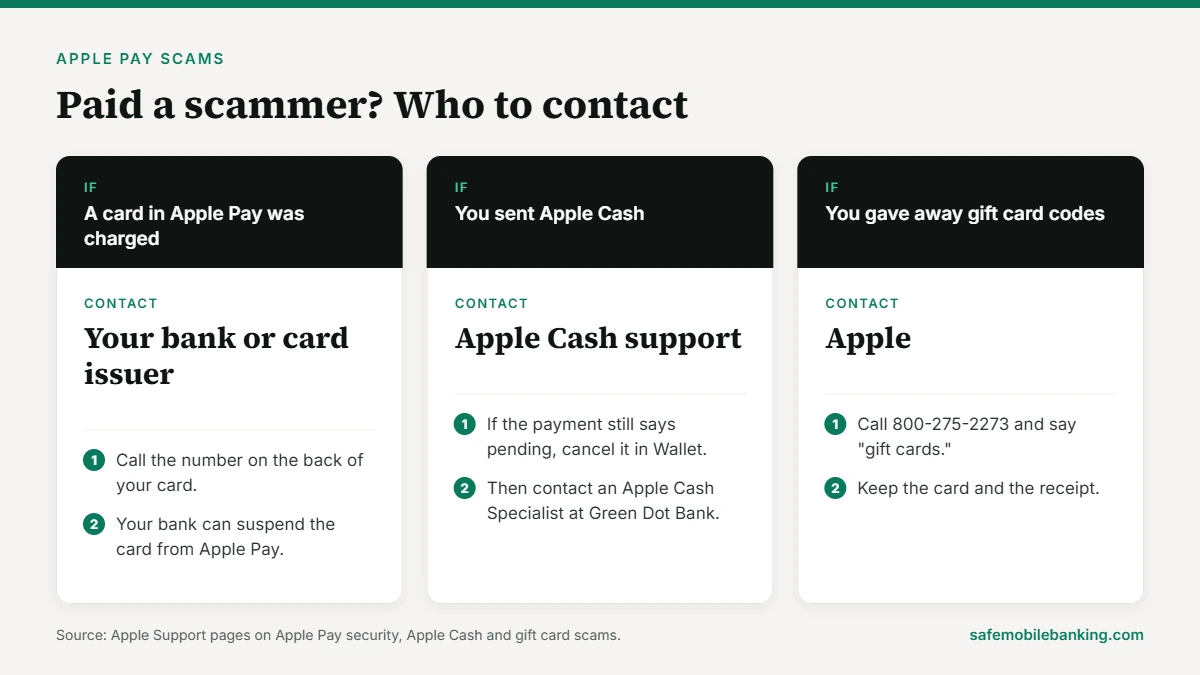
Move fast. What you do first depends on how the money left.
- A card in Apple Pay was charged. Call your bank or card issuer with the number on the back of the card. Apple says your Apple Pay transactions stay between you, the merchant and your bank or card issuer, and your bank can suspend the card from Apple Pay.
- You sent Apple Cash. Open Wallet and check the payment. If it says pending, the person hasn’t accepted it yet and you can cancel it. Then contact an Apple Cash Specialist at Green Dot Bank through Apple Support.
- You gave away Apple gift card codes. Call Apple at 800-275-2273 and say “gift cards.” The FTC says to ask if the money is still on the card, because Apple can freeze it. Keep the card and the receipt.
- You shared a password or code. Change your Apple Account password right away and make sure two-factor authentication is on. If you shared a bank code, tell your bank too.
- Report it. Email a screenshot of a fake Apple text, or forward a fake Apple email, to reportphishing@apple.com. Forward scam texts to 7726 (SPAM) or tap Report Junk in Messages. Then report the scam to the FTC at ReportFraud.ftc.gov. Our guide on how to report a scam lists every place to file.
Is Apple Pay itself safe to use?
Yes, for paying in stores, in apps and online. Apple Pay sends a device-specific number and a one-time security code instead of your card number, and each payment needs Face ID, Touch ID or your passcode (except when you use Express Mode). Apple Cash is different. Apple says its person-to-person payments are like any other private transaction between two people, so only send money to people you know. Apple Cash services come from Green Dot Bank, Member FDIC.
We cover how Apple Pay protects your card, and where it doesn’t, in Is Apple Pay safe? The same tricks also show up in PayPal scams and Zelle scams.
Read the full Apple Pay safety review (How it protects your card, Apple Cash rules and what to do if your iPhone is stolen.)
Apple Pay scams FAQ
Can Apple refund money I sent to a scammer with Apple Cash?
Maybe not. Apple says if you pay someone with Apple Cash for something you haven’t received, you might not be able to get your money back. If the payment still says pending, the person hasn’t accepted it and you can cancel it in Wallet. Otherwise, contact an Apple Cash Specialist at Green Dot Bank through Apple Support right away.
Will Apple ever call and ask for my verification code?
No. Apple says it will never ask for your Apple Account password, verification codes, device passcode or recovery key, and it will never ask you to tap Accept on a two-factor prompt or log in to a website. Scammers can spoof caller ID so a call looks like Apple. If someone calls claiming to be Apple Support, hang up.
Is a text about an Apple Pay charge real?
Treat it as a scam until you check it yourself. Fake fraud alerts about a suspicious purchase were among the text scams people reported most to the FTC in 2024. Don’t call the number or tap the link. Open the Wallet app to see your recent transactions, or call the number on the back of your card.
Can someone steal money through Apple Pay without my iPhone?
Apple Pay needs Face ID, Touch ID or your passcode for most payments, and it sends a device-specific number instead of your card number. Most Apple Pay scams work by getting a code, a password or a payment from you instead. If a stranger gets your bank’s verification code, they can use it to prove they’re you, so never share one.
Can I pay a bill or the IRS with Apple gift cards?
No. Apple says its gift cards can be used only for purchases from Apple, not for bills, taxes or government fees. Anyone who asks for Apple gift card codes as payment is a scammer. If you already gave the codes away, call Apple at 800-275-2273, say “gift cards” and ask if the money can be frozen.
How do I report an Apple Pay scam?
Email a screenshot of a fake Apple text, or forward a fake Apple email, to Apple’s phishing address listed above. Forward scam texts to 7726, or tap Report Junk in Messages. Then report the scam to the FTC at ReportFraud.ftc.gov, and call your bank or card issuer if a card was charged.
Sources
- Apple Support: Recognize and avoid social engineering schemes including phishing messages, phony support calls, and other scams
- Apple Support: Avoid scams when you use Apple Cash
- Apple Support: Send and receive money with Apple Cash
- Apple Support: Apple Pay security and privacy overview
- Apple Support: About gift card scams
- FTC: Got a call about fraud activity on your bank account? It could be a scammer
- FTC: New FTC data show top text message scams of 2024
- FTC: Avoiding and Reporting Gift Card Scams
This guide is general information, not financial or legal advice. Scam tactics change. Check Apple Support for its latest warnings.