Advertiser disclosure: Safe Mobile Banking may earn a commission from some companies we review. This guide on how to block scam calls on iPhone doesn’t promote any company. How we make money.
Short answer
How do you block scam calls on iPhone? Go to Settings, then Apps, then Phone. Set Screen Unknown Callers to Ask Reason for Calling, and under Call Filtering turn on Unknown Callers and the spam filter. Then make one rule: if a call claims to be your bank, hang up and call the number on your card.
- Call Screening makes unknown callers say who they are before your iPhone rings
- Carrier-flagged spam is silenced and sent to voicemail
- Caller ID can be faked, even when it shows your bank’s name
Turn on the 4 iPhone settings now (Free. About 2 minutes in Settings.)
Last verified: November 15, 2026, against Apple’s iPhone support guides for iOS 26 and the Federal Trade Commission’s 2025 fraud data.
Why scam calls are a banking problem
Most bank fraud starts with a conversation, not a hack. A caller poses as your bank’s fraud department, says your account is under attack, and asks you to read back a one-time code, approve a login or move money to a “safe” account. The Federal Trade Commission says imposter scams drew more than 1 million reports and $3.5 billion in reported losses in 2025. Learning how to block scam calls on iPhone is the cheapest protection you have.
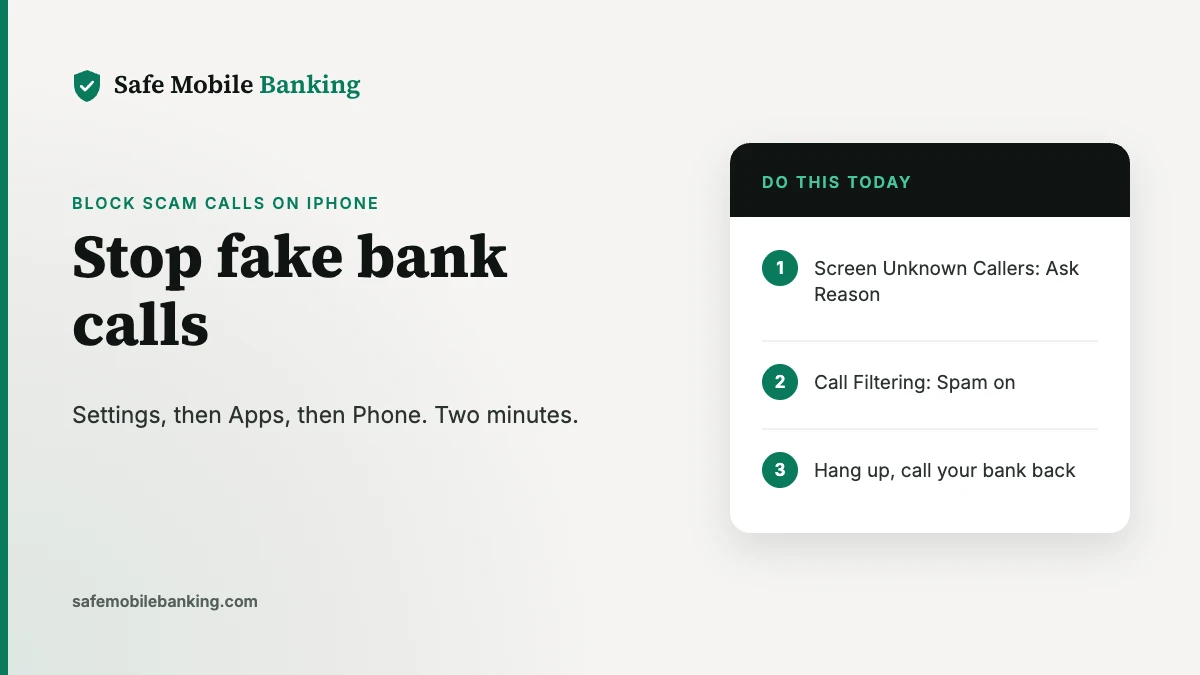
How to block scam calls on iPhone: 4 settings
These steps are for iOS 26. All of them start in Settings, then Apps, then Phone.
- Screen unknown callers. Scroll to Screen Unknown Callers and choose Ask Reason for Calling. Your iPhone answers calls from numbers not in your contacts, asks the caller for their name and reason, then rings and shows you the answer. Choose Silence instead if you’d rather send every unknown number straight to voicemail.
- Silence spam. Under Call Filtering, turn on the spam filter. Calls your carrier flags as possible spam or fraud are silenced, sent to voicemail and moved to a Spam list.
- Filter unknown callers. Under Call Filtering, turn on Unknown Callers. Missed calls and voicemails from unknown numbers move to their own list, out of your Recents.
- Turn on call identification. In Call Blocking & Identification, turn on Business Call Identification so verified businesses show their name.
Before you turn these on, save the numbers you can’t miss, such as your bank, doctor and your kids’ school, in Contacts. Apple notes that if you call emergency services, call screening turns off for 24 hours.
How to block a specific number on iPhone
- From a recent call: open the Phone app, tap Recents, tap the number, scroll down and tap Block Caller.
- From Settings (iOS 26): go to Settings, then Privacy & Security, then Blocked Contacts, tap Add Blocked Contact.
A blocked caller can still leave voicemail, but you won’t be notified, and the caller isn’t told they’re blocked. Scammers switch numbers constantly, so screening and filtering stop far more calls than blocking one number at a time.
What to do when a caller says they’re your bank
- Hang up. Don’t press a number to “speak to fraud.”
- Call the number on the back of your card, or open your bank’s app yourself.
- Never share a one-time code, PIN or password, and never move money to a “safe account.” A real bank won’t ask.
- Never dial a code a caller gives you. Codes like *72 or **21 followed by a number forward your calls, so your bank’s verification calls go to the scammer. Best Cellular explains call forwarding codes by network, including how to turn forwarding off.
If you already shared a code or sent money, follow our steps on how to report a scam right away.
What your carrier can do
Your wireless carrier is what flags the spam calls your iPhone silences, and it controls the bigger risk: someone moving your phone number to their SIM card to receive your bank’s text codes. Lock your number with your carrier and set an account PIN. Our guide to preventing SIM swap fraud shows the free lock at each carrier, and Best Cellular has carrier account details for Verizon, AT&T and T-Mobile.
Do scam calls also come by text?
Yes. Text messages were the most common way scammers made contact in 2025, according to the FTC. In the Messages app, tap the Filter button, then Manage Filtering, and turn on Screen Unknown Senders. Fake payment-app texts work like the email scams in our guide to spotting a PayPal scam email.
Frequently asked questions
How do I stop scam calls on my iPhone?
Go to Settings, then Apps, then Phone. Set Screen Unknown Callers to Ask Reason for Calling or Silence, and under Call Filtering turn on Unknown Callers and the spam filter. Save the numbers you need, like your bank and doctor, in Contacts so they still ring.
Will silencing unknown callers block calls I need?
It can. Silenced calls go to voicemail, so a delivery driver or new doctor’s office may not get through. Ask Reason for Calling is a middle ground: unknown callers state their name and reason, then your iPhone rings and shows it.
How do I block a specific number on iPhone?
Open the Phone app, tap Recents, tap the number, scroll down and tap Block Caller. In iOS 26 you can also go to Settings, then Privacy & Security, then Blocked Contacts. Blocked callers can still leave voicemail, but you won’t be notified.
What if a caller says they’re from my bank?
Hang up and call the number on the back of your card. Banks don’t call to ask for a one-time code, your PIN or a transfer to a safe account. Caller ID can be faked, so a call that shows your bank’s name proves nothing.
Why would a caller ask me to dial a code?
Some scammers ask you to dial a code like *72 or **21 followed by a number. Those codes forward your calls, so the scammer receives your bank’s verification calls. Never dial a code someone gives you.
Sources
- Apple Support: Manage unknown callers on iPhone (Screen Unknown Callers, Call Filtering; checked Nov 15, 2026)
- Apple iPhone User Guide: Screen and block calls (iOS 26)
- Apple Support: Block phone numbers, contacts and emails
- Apple Personal Safety Guide: Block, screen and filter communications (Screen Unknown Senders in Messages)
- Federal Trade Commission: 2025 fraud reports and losses
Safe Mobile Banking is a publisher, not a financial advisor. This guide is general information. iPhone is a trademark of Apple Inc.; we’re not affiliated with Apple. See our editorial standards.