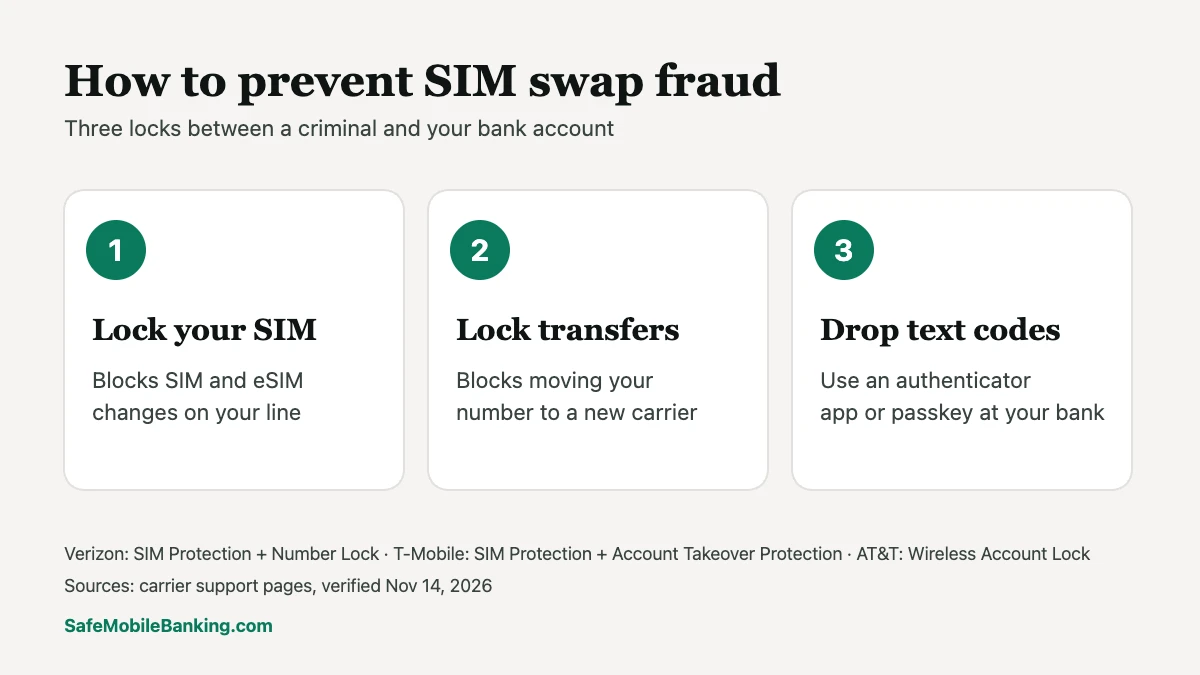
How to prevent SIM swap fraud: turn on your carrier’s free lock (Verizon SIM Protection and Number Lock, T-Mobile SIM Protection and Account Takeover Protection, or AT&T Wireless Account Lock), set an account PIN, and move your bank login off text-message codes. A SIM swap moves your phone number to a criminal’s phone so they receive your bank’s security codes. The carrier lock blocks that move until you switch it off yourself.
Find your carrier’s lock (Free on all three major carriers. Takes about two minutes in the app.)
Last verified: November 14, 2026, against Verizon, T-Mobile and AT&T support pages and the Federal Communications Commission’s SIM swap rules.
What is a SIM swap?
A SIM swap is when someone convinces your carrier to move your phone number onto a SIM card or eSIM they control. From that moment, your calls and texts go to their phone, not yours. Port-out fraud is the same attack using a transfer to a different carrier instead of a new SIM.
Criminals usually start with personal details from a data breach or a phishing message, then pose as you to the carrier. Some attacks rely on tricking or bribing carrier employees.
Why a SIM swap scam can empty your bank account
Many banks send a one-time code by text message when you log in, reset a password or add a new payee. Whoever holds your phone number receives that code. With your number, a criminal can reset your banking password, sign in and move money, often within an hour.
The losses are real. PCMag reported that SIM-swapping attackers stole $68 million from victims in 2021, and federal prosecutors alleged in a 2024 indictment that a single SIM swap scheme netted $400 million in cryptocurrency.
How to prevent SIM swap fraud in 3 steps
- Turn on your carrier’s SIM lock. It blocks SIM and eSIM changes on your line until you switch it off yourself.
- Turn on your carrier’s port-out protection and set a strong account PIN. This blocks transfers of your number to another carrier. Don’t reuse your bank PIN or any number tied to your birthday or address.
- Move your bank login off text-message codes. If your bank offers an authenticator app, a passkey or in-app approval, use it. Text codes are the part of your banking a SIM swap can steal.
SIM swap protection by carrier
| Carrier | Stops SIM swaps | Stops number transfers | Where to turn it on |
|---|---|---|---|
| Verizon | SIM Protection | Number Lock | My Verizon app or website, Security settings |
| T-Mobile | SIM Protection | Account Takeover Protection | T-Life app or T-Mobile.com, account settings |
| AT&T | Wireless Account Lock (one switch covers SIM changes and number transfers) | myAT&T app | |
Verizon: SIM Protection and Number Lock
Verizon’s SIM Protection is free and blocks any change to the SIM on a protected line, including SIM swaps, device upgrades and bring-your-own-device activations. Only the account owner or an account manager can turn it on or off, and Verizon says its store and phone representatives can’t turn it off for you. After it’s switched off, SIM changes stay blocked for 15 minutes. Number Lock is the second switch: a line with Number Lock on can’t generate the Number Transfer PIN needed to move the number to another carrier.
Switching away from Verizon on purpose? Turn Number Lock off first, then get your transfer PIN. Best Cellular’s Verizon transfer PIN guide walks through it.
T-Mobile: SIM Protection and Account Takeover Protection
T-Mobile’s SIM Protection lets you lock all lines on the account, or only the ones you choose, against SIM changes. The Primary Account Holder or an Authorized User can turn it on, but only the Primary Account Holder can turn it off. Account Takeover Protection is a separate free feature that blocks unauthorized transfers of your number to another carrier. It’s added line by line, and the Billing Responsible Party has to contact T-Mobile to remove it. T-Mobile says it’s available to Postpaid, Business, Prepaid and Metro by T-Mobile customers.
See Best Cellular’s T-Mobile transfer PIN guide before you switch carriers on purpose.
AT&T: Wireless Account Lock
AT&T launched Wireless Account Lock in July 2025. One switch in the myAT&T app blocks device upgrades, SIM and eSIM changes, number transfers, new lines, billing changes, authorized-user changes and phone-number changes until you turn it off.
Best Cellular’s AT&T transfer PIN guide covers the steps when you do want to leave.
Prepaid and smaller carriers
Under rules the Federal Communications Commission adopted in 2023, wireless providers, including resellers, must offer customers a way to lock their accounts against SIM changes and number transfers. Look in your carrier’s app under security or account settings for a SIM lock, account lock or port-out protection setting. Best Cellular’s transfer PIN lookup for every US carrier lists what each carrier calls its transfer PIN.
Protect the bank side too
- Swap text codes for an authenticator app or passkey wherever your bank offers one.
- Turn on bank alerts for logins, password changes, new payees and transfers, by email and in the app, not only by text.
- Use a unique password for your bank and your email. Your email is often the reset path for everything else.
- Check an app’s security before you sign up. Two-step login and account alerts are part of the security test in our Safety Score.
- Freeze your credit at Equifax, Experian and TransUnion. It’s free and stops new accounts being opened in your name.
Signs of a SIM swap attack
- Your phone suddenly shows “No Service” or “SOS only” where it normally works.
- You get a text or email from your carrier about a SIM change, a new device or a transfer request you didn’t make. FCC rules require carriers to notify you of these requests.
- You can’t log in to your bank or email, or you get password-reset messages you didn’t ask for.
What to do in the first hour
- Call your carrier from another phone and report a fraudulent SIM change or port.
- Call your bank’s fraud line (the number on the back of your card) and freeze transfers.
- Change your email password, then your bank password, from a device you trust.
- Report it at IdentityTheft.gov and keep a written record of every call.
What the FCC requires carriers to do
The Federal Communications Commission adopted SIM swap and port-out fraud rules at its November 15, 2023 meeting. Carriers must use secure methods to confirm it’s really you before a SIM change or number transfer, notify you immediately when one is requested, and offer you the option to lock your account against them. The rules let each carrier choose how to meet those requirements, which is why the lock names and steps differ.
Frequently asked questions
What is a SIM swap scam?
It’s a scam where a criminal gets your carrier to move your phone number to a SIM they control, then uses your texts to reset passwords and take over accounts, especially bank and email accounts.
Does a SIM lock stop me from upgrading my phone?
Yes, until you turn it off. Verizon’s SIM Protection blocks upgrades and new SIMs, and SIM changes stay blocked for 15 minutes after you switch it off. Turn it back on after the upgrade.
Are carrier SIM locks free?
Verizon describes SIM Protection as available at no cost, and T-Mobile describes Account Takeover Protection as a free feature. AT&T’s Wireless Account Lock is turned on in the myAT&T app.
Can a carrier store employee turn off my lock?
At Verizon, no: its retail and customer service representatives can’t turn SIM Protection off for you. At T-Mobile, only the Primary Account Holder can turn SIM Protection off.
Is an eSIM safer than a physical SIM?
Not by itself. A criminal can request a new eSIM just as they would a physical SIM. The carrier lock is what blocks the change.
Sources
- Verizon: SIM Swapping and SIM Protection (verified Nov 14, 2026)
- Verizon: Enable or disable SIM Protection and Number Lock (verified Nov 14, 2026)
- T-Mobile: SIM Protection and Account Takeover Protection (verified Nov 14, 2026)
- MacRumors: AT&T launches Wireless Account Lock (July 1, 2025)
- Federal Register: Protecting Consumers From SIM Swap and Port-Out Fraud (FCC rules adopted Nov 15, 2023)
- PCMag via Yahoo Tech: AT&T tackles SIM-swapping scams (2021 loss figure); Ars Technica, Dan Goodin, July 2025 ($400 million indictment)
This article was researched and written by Safe Mobile Banking’s AI-assisted research software and checked against the sources above. It is general information, not financial or legal advice.