Advertiser disclosure: This Cash App fee calculator is free and independent. Cash App doesn’t pay for it, and it doesn’t collect anything you enter. How we make money.
Short answer
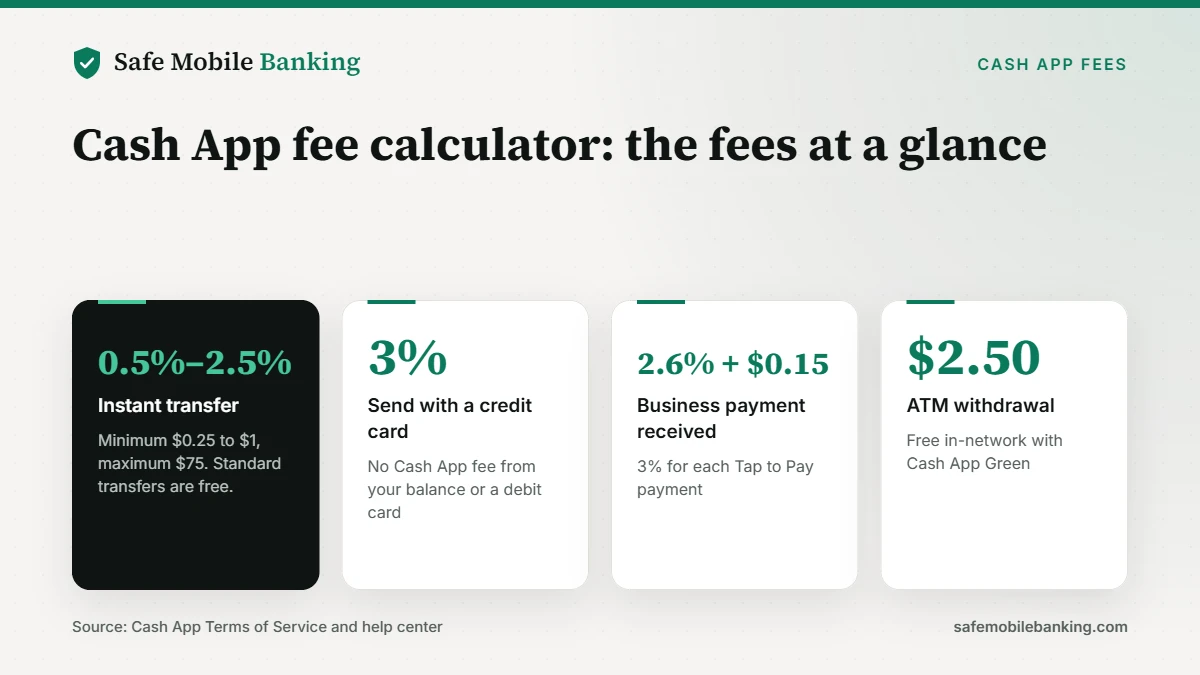
This Cash App fee calculator shows what Cash App charges for an instant transfer, a credit card payment, a business payment, an ATM withdrawal or a paper money deposit. Cash App’s terms list instant transfers at 0.5% to 2.5% (minimum $0.25 to $1, maximum $75), credit card sends at 3%, and ATM withdrawals at $2.50.
- Standard transfers to your bank are free.
- Instant transfers cost a percentage. The exact fee shows before you confirm.
- Nothing you enter is saved or sent, and it never asks for your login.
Use the Cash App fee calculator (Free. No sign-up. 7 transaction types.)
Last verified: November 18, 2026, against Cash App’s Terms of Service fee schedule and its help center pages on transfers, ATM fees and business accounts.
How the Cash App fee calculator works
Pick what you’re doing in Cash App, then enter the amount. The Cash App fee calculator applies the fee from Cash App’s own published schedule and shows what you pay, what you keep and what arrives. Instant transfers show a range, because Cash App sets the exact rate per transfer.
Cash App fee calculator
What Cash App will charge
Pick a transaction and enter the amount. Fees come from Cash App’s own terms.
The ATM shows its own fee before you confirm.
Cash App fee
$2.50 to $12.50
Typically arrives right away
Cash App’s terms list 0.5% to 2.5%, with a minimum of $0.25 to $1 and a maximum of $75. The exact fee shows before you confirm.
See Cash App’s safety scoreYour numbers stay in this tab. Nothing is saved or sent.
What are Cash App’s fees?
Cash App’s Terms of Service and help center list these fees for U.S. accounts, and the Cash App fee calculator uses them:
| Transaction | Cash App fee |
|---|---|
| Instant transfer to a debit card | 0.5% to 2.5% (minimum $0.25 to $1, maximum $75) |
| Standard transfer to your bank | Free, usually 1 to 3 business days |
| Send from a credit card | 3% |
| Send from your balance or debit card | $0 |
| Business payment received | 2.6% + $0.15 |
| Tap to Pay (business) | 3% |
| ATM withdrawal | $2.50, plus any ATM operator fee |
| Paper money deposit | $1 per deposit |
How is the Cash App instant transfer fee calculated?
Cash App’s transfer speed help page says instant transfers typically arrive immediately to your linked debit card and cost 0.5% to 2.5%, with a minimum of $0.25 to $1 and a maximum of $75. The fee is displayed before you complete the transaction.
Because the rate isn’t fixed, the Cash App fee calculator shows the lowest and highest possible fee. On a $500 transfer, that’s $2.50 to $12.50. Above $3,000, the $75 cap can apply. If you can wait, a standard transfer costs nothing.
What does Cash App charge at an ATM?
Cash App’s ATM fee page says the Cash App Card works at any ATM with a $2.50 Cash App fee, and most out-of-network ATMs add their own operator fee. In-network withdrawals are free for customers who qualify for Cash App Green, by spending $500 or more in qualifying purchases or receiving $300 or more in qualifying paycheck deposits.
One change to know, and one the Cash App fee calculator reflects: as of November 5, 2025, Cash App no longer reimburses out-of-network ATM fees.
What does a Cash App Business account cost?
Creating a Cash App Business account is free. Cash App’s business account page says it deducts a 2.6% + $0.15 processing fee on each payment received from a customer’s Cash App account, and a 3% fee on each payment accepted with Tap to Pay. On a $100 sale, that’s $2.75, which the Cash App fee calculator shows under Business payment. Personal payments don’t carry the fee, which is why Cash App asks you to keep business and personal payments separate.
Which guides go with this calculator?
- Is Cash App safe? Our Safe Mobile Banking Score
- Cash App scams: 8 tricks to avoid
- Payment scam checker
- Is Venmo safe?
- Is Zelle safe?
Every app we review gets a Safe Mobile Banking Score. See how we rate them.
See Cash App’s safety score (Fees, protections and complaints in one place.)
Cash App fee calculator FAQ
Does this Cash App fee calculator save what I enter?
No. The calculator runs entirely in your browser tab. Amounts you enter aren’t stored, sent to a server or shared, and they disappear when you close the page. It isn’t connected to Cash App or your account, and it never asks for a $cashtag, phone number or sign-in.
How much does Cash App charge for an instant transfer?
Cash App’s terms list an Instant Transfer fee of 0.5% to 2.5%, with a minimum of $0.25 to $1 and a maximum of $75. The exact fee is disclosed before you complete the transfer. On $500, that range works out to $2.50 to $12.50. A standard transfer is free.
How do I avoid Cash App fees?
Use a standard transfer instead of an instant one, which is free and usually arrives in 1 to 3 business days. Send payments from your Cash App balance or a debit card instead of a credit card. For cash, in-network ATM withdrawals are free if you qualify for Cash App Green.
Does Cash App charge to receive money?
Not on a personal account, according to Cash App’s fee schedule. A Cash App Business account is different: Cash App deducts 2.6% + $0.15 from each payment received from a customer’s Cash App account, and 3% from each payment accepted with Tap to Pay.
Is it safe to use a Cash App fee calculator?
This one is, because it never asks for your login, $cashtag, card number or one-time code. Be wary of any site or caller that asks for those to check or refund a fee. Our guide to Cash App scams covers the fake support tricks to watch for.
Sources
- Cash App: Terms of Service (fee schedule)
- Cash App: Withdrawal transfer speed options
- Cash App: ATM fees on Cash App Card
- Cash App: Create a Cash App Business account
This tool gives general information, not financial advice. Cash App shows the exact fee in the app before you confirm, and that number is the one that applies.