Advertiser disclosure: This guide to Facebook Marketplace scams is free and independent. Safe Mobile Banking may earn a commission from some companies we review, but Meta and the payment apps named here don’t pay for this page. How we make money.
Short answer
Facebook Marketplace scams usually come down to payment tricks: a fake Zelle “business upgrade” email, a request for a verification code, an overpayment you’re asked to refund, or a deposit sent outside Facebook checkout. Avoid them by never sharing codes, confirming money in your own bank app, and paying through checkout or in person.
- Zelle has no paid “business upgrade”; the email is fake
- A buyer asking for a texted code is always a scam
- Purchase Protection doesn’t cover local pickups or Messenger deals
See the 3 rules that stop most Marketplace scams (Free. Takes one minute.)
Last verified: November 15, 2026, against Federal Trade Commission consumer alerts, Zelle’s marketplace scam warning and Meta’s Purchase Protection policy.
Facebook Marketplace scams: the short version
| Scam | Red flag | Source |
|---|---|---|
| Zelle “business upgrade” | Email says you must pay to unlock a pending payment | Zelle |
| Verification code | Buyer asks you to read back a code texted to you | FTC |
| Overpayment or fake check | Buyer pays too much and asks for the difference back | FTC |
| Fake payment notice | A screenshot or email says you’ve been paid; your bank shows nothing | FTC |
| Deposit outside checkout | Seller wants a deposit, shipping or “insurance” fee by payment app | Meta |
What is the Zelle business account scam?
A “buyer” insists on paying with Zelle. Then you get an email that looks like it’s from Zelle saying the payment is pending and you need to “upgrade” to a business account, often by sending the buyer a few hundred dollars that will supposedly come back with the payment. It never does.
Zelle warns about exactly this: scammers send fake emails claiming you must send money to upgrade your account and release a payment. Zelle says it only emails from @zelle.com or @zellepay.com, never from Gmail, Yahoo or AOL. Check for the money in your own bank app. If it isn’t there, you haven’t been paid. More in our guide to whether Zelle is safe.
Why does a Marketplace buyer want my verification code?
Because they’re stealing your phone number. The FTC says a fake buyer claims they’ve seen fake listings and wants to make sure you’re real, then sends you a Google Voice verification code and asks you to read it back. With it, they create a Google Voice number linked to your real number and use it to scam others while hiding who they are.
The FTC’s rule is simple: don’t share any verification code with someone you didn’t contact first. If you already did, follow Google’s steps to reclaim your number.
How do overpayment and fake payment scams work?
In an overpayment scam, a buyer sends a check or payment for more than your price and asks you to send back the difference. The FTC notes it can take weeks for a bank to discover a fake check; by then you’ve lost the item and the money you sent, and the bank takes the check amount back from your account.
In a fake payment scam, the buyer sends a fake notification and hopes you hand over the item before you notice. Never trust a screenshot or email. Open your own banking or payment app and confirm the money has landed.
Does Facebook protect Marketplace purchases?
Only when you pay through Facebook’s checkout. Meta’s Purchase Protection covers eligible purchases completed with onsite checkout on Facebook or Instagram. Purchases through third-party sites, local pickups, Messenger transactions and other messaging services don’t qualify.
That’s why scam sellers push you to pay a deposit, shipping cost or “insurance” fee by Zelle, Cash App or Venmo for an item they’ll ship. Once you pay outside checkout, Facebook can’t help, and peer-to-peer payments are hard to reverse. See is Cash App safe and is Venmo safe for how each app handles disputes.
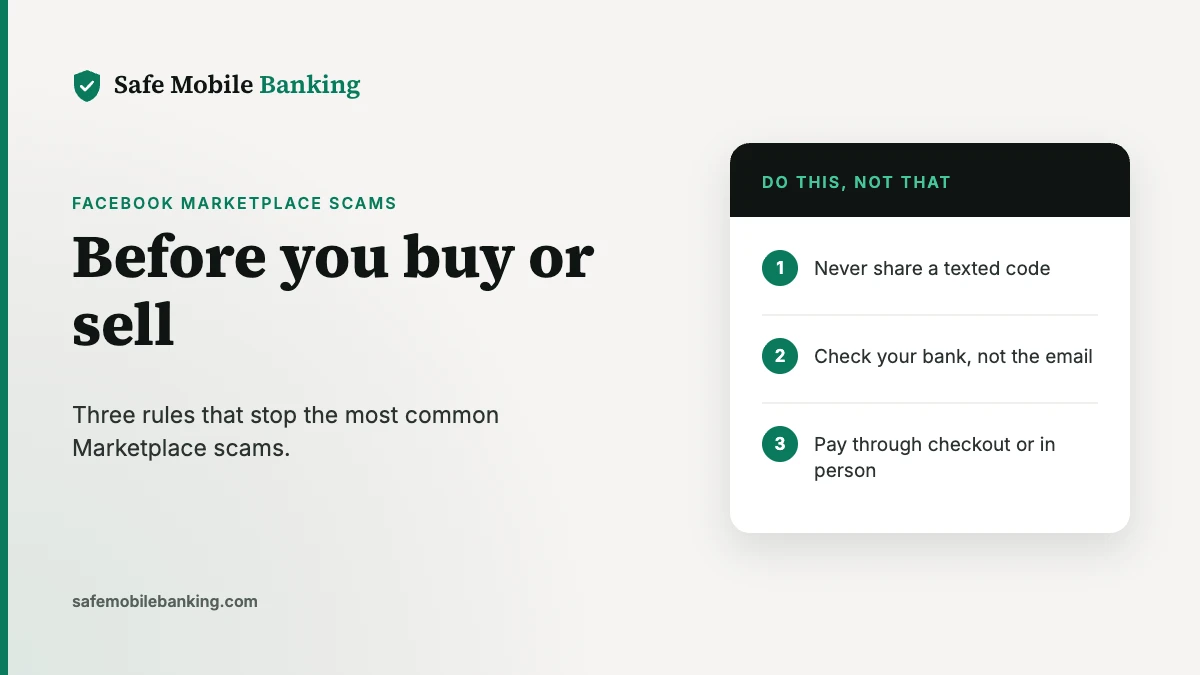
How to avoid Facebook Marketplace scams: 3 rules
- Never share a texted code. No real buyer or seller needs one.
- Check your bank, not the email. Money counts only when it shows in your own account, and never send money to receive money.
- Pay through checkout or in person. For shipped items, use Facebook checkout. For local deals, meet in a public place and pay when you have the item.
Already sent money? Follow our guide on how to report a scam. If a scammer got into your bank login, see what to do if your bank account is hacked.
Frequently asked questions
What are the most common Facebook Marketplace scams?
The most common payment scams are fake Zelle business-upgrade emails, Google Voice verification-code requests, overpayments or fake checks with a request to refund the difference, fake payment notifications, and sellers who ask for a deposit or shipping fee outside Facebook checkout.
Does Zelle have a business account upgrade?
No. Zelle warns that scammers send fake emails claiming you must pay to upgrade your account to receive a pending payment. Zelle says it only emails from @zelle.com or @zellepay.com. If a buyer asks you to pay an upgrade fee, it’s a scam.
Why does a buyer want my verification code?
It’s a scam. The FTC says fake buyers ask for a Google Voice verification code so they can link a Google Voice number to your phone number and hide their identity. Never share a verification code with someone you didn’t contact first.
Does Facebook protect Marketplace purchases?
Only some. Meta’s Purchase Protection covers eligible purchases made through onsite checkout on Facebook or Instagram. Local pickups, Messenger deals and payments through other apps don’t qualify. For local deals, meet in person and pay when you have the item.
What should I do if I was scammed on Facebook Marketplace?
Contact your bank or payment app right away and ask it to stop or reverse the payment. Report the profile and listing to Facebook, report the scam at ReportFraud.ftc.gov, and keep screenshots of the listing, messages and payment.
Sources
- FTC: Selling stuff online? Here’s how to avoid a scam (fake payments, overpayments, verification codes)
- FTC: The Google Voice verification code scam
- Zelle: How to avoid an online marketplace scam (fake upgrade emails, official email domains)
- Meta: Purchase Protection policy (onsite checkout only; local pickups and Messenger excluded)
- ReportFraud.ftc.gov
Safe Mobile Banking is a publisher, not a bank or financial advisor. This article is general information, not legal or financial advice. Facebook and Marketplace are trademarks of Meta Platforms, Inc.; Zelle is a trademark of Early Warning Services, LLC. We’re not affiliated with either. See our editorial standards.