Advertiser disclosure: This Square fee calculator is free and independent. Square doesn’t pay for it, and it doesn’t collect anything you enter. How we make money.
Short answer
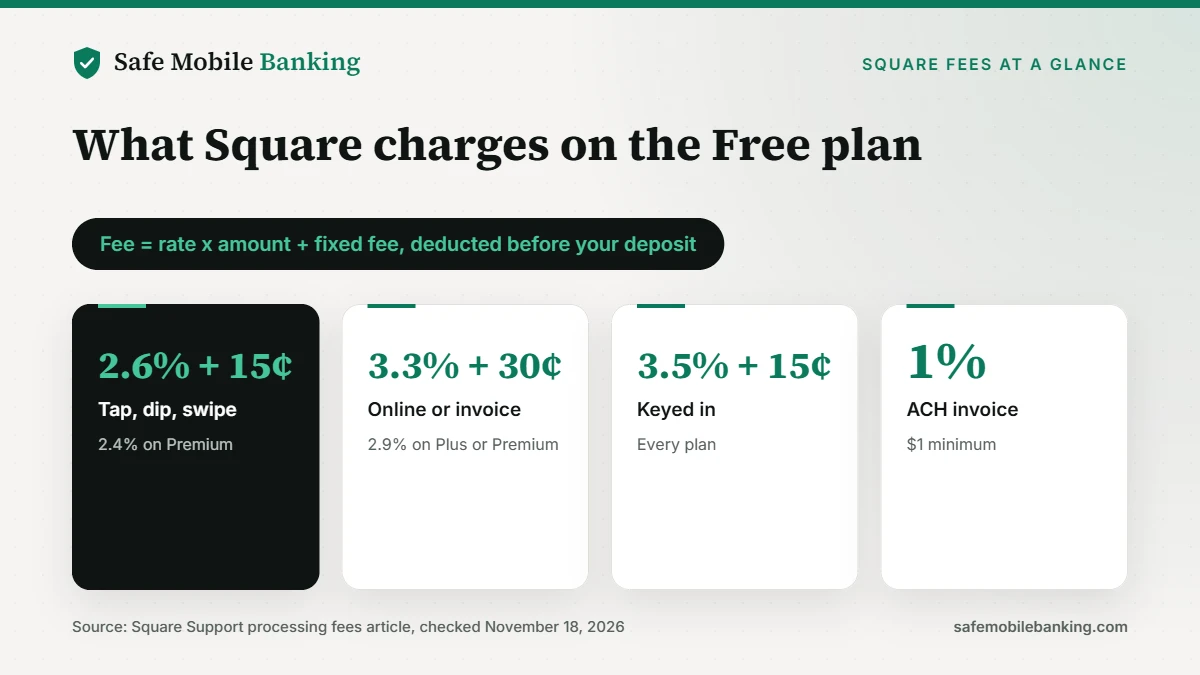
This Square fee calculator shows what Square takes from a payment on its Free, Plus or Premium plan. On the Free plan, Square charges 2.6% + 15¢ for tap, dip or swipe, 3.3% + 30¢ for online payments and invoices, and 3.5% + 15¢ for keyed-in or card-on-file payments. ACH bank transfers through invoices cost 1%, with a $1 minimum.
- Plus and Premium cut the online rate to 2.9% + 30¢ and cap ACH at $10.
- Keyed-in payments cost the most at 3.5% + 15¢ on every plan.
- Nothing you enter is saved or sent, and it never asks for your login.
Use the Square fee calculator (Free. No sign-up. 3 plans, 6 payment types.)
Last verified: November 18, 2026, against Square’s U.S. help center article on processing fees.
How the Square fee calculator works
Pick your Square plan and how the customer pays, then enter the amount. The Square fee calculator applies Square’s published rate for that plan and payment type and shows the fee, what you receive and your effective rate. Turn on Work backward to see what to charge so you keep a set amount.
What Square will charge
Pick your plan and how the customer pays. Rates come from Square’s U.S. help center.
Your numbers stay in this tab. Nothing is saved or sent.
What are Square’s processing fees in 2026?
Square’s processing fee article lists these U.S. rates. The Square fee calculator uses them:
| Payment type | Square Free | Square Plus | Square Premium |
|---|---|---|---|
| Tap, dip or swipe | 2.6% + 15¢ | 2.5% + 15¢ | 2.4% + 15¢ |
| Online or invoices | 3.3% + 30¢ | 2.9% + 30¢ | 2.9% + 30¢ |
| Online API | 2.9% + 30¢ | 2.9% + 30¢ | 2.9% + 30¢ |
| Keyed in or card on file | 3.5% + 15¢ | 3.5% + 15¢ | 3.5% + 15¢ |
| ACH bank transfer (invoice) | 1%, $1 minimum | 1%, $1 minimum, $10 cap | 1%, $1 minimum, $10 cap |
| Afterpay | 6% + 30¢ | 6% + 30¢ | 6% + 30¢ |
How much does Square take from a $100 payment?
On the Free plan, a $100 tap, dip or swipe costs $2.75 and you keep $97.25. The same $100 online costs $3.60. On Plus, those fees drop to $2.65 and $3.20, and on Premium to $2.55 and $3.20. A $100 keyed-in payment costs $3.65 on any plan, and $100 through Afterpay costs $6.30. The Square fee calculator shows every combination.
Is Square Plus or Premium worth it for lower fees?
It depends on volume. Plus saves 0.1 point on in-person payments and 0.4 point on online payments and invoices compared with Free, and Premium saves 0.2 point in person. Those are monthly subscription plans, so compare the savings with the plan price on Square’s pricing page. On $10,000 a month in online sales, the 0.4-point difference is $40.
How much does Square charge for ACH invoice payments?
Square charges 1% for ACH bank transfers paid through invoices, with a $1 minimum. On Plus and Premium, the fee is capped at $10. A $2,000 invoice paid by ACH costs $20 on the Free plan and $10 on Plus or Premium. ACH transfers deposited into Square Checking have no fee on any plan, Square says.
How do I price to cover Square fees?
Work backward from what you want to keep. To keep $100 on a tap, dip or swipe on the Free plan, charge $102.82: Square takes $2.82 and $100 reaches your bank. The Square fee calculator’s Work backward option does this for every plan and payment type.
How do I lower my Square fees?
- Take cards in person when you can. Tap, dip or swipe costs less than online or keyed payments.
- Avoid keying in cards. 3.5% + 15¢ is the highest card rate Square charges.
- Offer ACH on large invoices. 1% beats 3.3% + 30¢, and Plus and Premium cap it at $10.
- Check your volume against a paid plan. Lower rates only pay off above a certain monthly volume.
- Run your prices through the Square fee calculator.
Which tools go with this calculator?
- Credit card processing fee calculator: Stripe vs Square vs PayPal
- Stripe fee calculator
- Cash App fee calculator (Cash App Business)
- Payment scam checker
Every app we review gets a Safe Mobile Banking Score. See how we rate them.
Compare card processing fees (Stripe, Square and PayPal side by side.)
Square fee calculator FAQ
Does this Square fee calculator save what I enter?
No. The calculator runs entirely in your browser tab. Amounts you enter aren’t stored, sent to a server or shared, and they disappear when you close the page. It isn’t connected to Square or your account.
How much does Square charge per transaction?
On the Free plan, Square charges 2.6% + 15¢ for tap, dip or swipe, 3.3% + 30¢ for online payments and invoices, 2.9% + 30¢ through its online API and 3.5% + 15¢ for keyed-in or card-on-file payments. Plus and Premium lower the in-person and online rates.
How much does Square take from $100?
On the Free plan, $2.75 for a $100 in-person card payment and $3.60 for $100 online. On Plus, $2.65 and $3.20. On Premium, $2.55 and $3.20. Keyed-in payments cost $3.65 on every plan.
What is Square’s fee for ACH invoice payments?
1% with a $1 minimum. Plus and Premium cap it at $10 per payment. ACH transfers deposited into Square Checking have no fee.
How do I pass Square fees to my customers?
Charge enough that the amount after fees equals your price. To keep $100 on a Free-plan in-person payment, charge $102.82. Check your card network and state rules before adding a separate surcharge.
Sources
This tool gives general information, not financial advice. Rates can vary by plan and account, so the Pricing and subscriptions page in your Square Dashboard is the number that applies.